
As long as I can remember that I have had flat rate internet connection (the village I’m from we gathered together and digged our own fiber optics but that’s a story for later), I have always had some sort of homelab up and running, started with a fire hazard cardboard box with a 133 Mhz motherboard from a IBM Aptiva in it, for the sake of easy modifications, thank god that it never catch fire.
In university years it was mainly some raspberry pi placed nearby the router. And up to today a few raspberry pi’s and a Synology NAS everything is maxed out on CPU usage and RAM memory allocation, docker instances provisioned by Hashicorp Nomad and different services around for service discovery. I’m in big need for an upgrade, the NAS is not intended for this kind of load.
So when I found out about the MINI RACK project initiated by Jeff Geerling I was hooked. For the software stack I was kind of clueless I had got bitten by the bug with specified deployments instead of writing long bash scripts for setting up a service, or manually install everything and doing ClickOps. I needed to go further with the next steps in my journey of handling a homelab.
Let me present GitOps a term which I have ignored for so many years due to time constrains in my life but Mischa van den Burg have introduced with a clear path defining everything in Git and let the magic happens to be deployed to a kubernetes cluster so why not just build my own cluster then? The truth was that the idea of building my own homelab sparked by Mischa.
Here we are! my homelab is being upgraded and redesigned from scratch but my NAS will still be in the picture but only for long term backup and nothing else.
![[1 Projects/HomeLab/rack drawing.md#^group=ehMHUDvhqVNq46NiOh9xF]]
The software stack with Hashicorp Nomad is migrated to Kubernetes, instead of different kind of pipeline scripts for deploying the services, I use FluxCD for the Gitops part, instead of using the NAS slow mechanical disk i build a Rook-Ceph cluster where data on the Minisforum MS-A2 NVMe disks can be shared between the nodes, on its own 10 GBe SPF+ network. I started with two worker nodes and a raspberry PI as a companion for handling the control plane to maintain quorum. Too keep my hands from custom quick fix I use Talos Linux which is a distribution for Kubernetes and keep it’s file system immutable and without SSH ability.
| Units | Type | SKU | Price (SEK) | Note | Bought |
|---|---|---|---|---|---|
| 1 | Switch | Mikrotik CRS305-1G-4S+IN | 1400 | x | |
| 5 | Cable | SFP+ DAC | 147 | x | |
| 2 | Node | Minisform MS-A2 | 10258 | x | |
| 2 | NVMe | Crucial T500 4TB CT4000T500SSD3 | 3272 | 4 TB | x |
| 2 | NVme | Bootdisk: SABRENT 2230 M.2 NVMe Gen 4 1TB | 1257 | x | |
| 2 | Adapter | NFHK M.2(A+E Key) 2230MM to NVME M-Key | 153 | x | |
| 2 | RAM | Crucial DDR5 RAM 96GB Kit CT2K48G56C46S5 | 2422 | x | |
| 1 | UPS | Not decided yet | |||
| 1 | RPI | NUTS | |||
| 1 | rack | DeskPi RackMate T1 | 1947 | x | |
| 1 | hylla | GeeekPi DeskPi Rack Shelf 10" | 343 | x | |
| Total | 39 129 |
The only issue I have found is that I cannot boot with the NVMe I have on the Wifi slot with a M.2(A+E Key) adaptor, but that is solved with PXE network boot, so not an issue in my setup.
I’m not done with the networking parts yet, still need to reconfigure the VLANs and get one more Switch with more ports
But this is what I have in mind
!
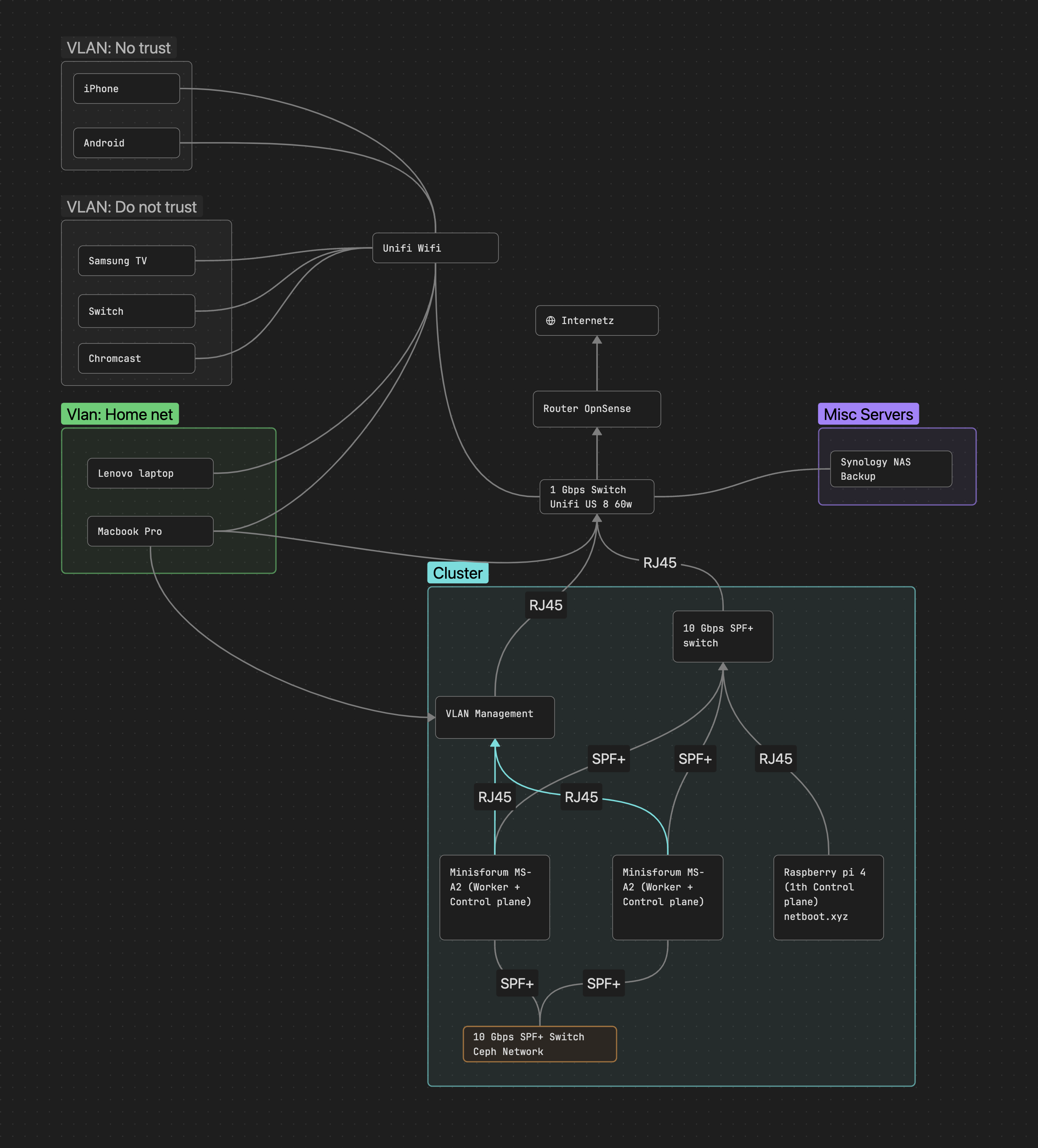
In the next post, I will go through the software stack of the cluster and how it is configured.